











By Paul Bertorelli
Although we’re not sure they should, some pilots worry about the risk of mid-air collision to the point of obsession. The threat seemingly looms large but, in reality, mid-airs are so far down the list of things that can kill you in an airplane that the numbers are sometimes too small to measure accurately.
On the other hand, if you have a close call or actually swap paint, one-in-a-million odds mean squat. Anyone who’s had the bejesus scared out of them will want an anti-collision device of some kind, thus a lively if not vast market for this equipment has emerged.
The fact that decent anti-collision gear is so expensive, however, has kept it from becoming a common feature in light aircraft cockpits. Twenty grand is just too hard a hit for most owners. Recognizing that, Garmin last year announced a new, ground-based anti-collision system that uses ATC radar data uplinked through a Mode-S transponder. The Garmin GTX330 transponder receives and displays the FAA’s much vaunted traffic information service or TIS through a Mode-S link.
Breakthrough technology? Yes and no. Yes, because it offers capable, sophisticated display of collision threats at a price roughly one quarter that of full-blown anti-collision systems such as Goodrich’s Skywatch or the Ryan TCAD series.
No, because it relies on Mode-S coverage, which, although available in congested terminals, offers far from blanket coverage. What the GTX330 is, then, is an expensive, sophisticated transponder that also delivers effective, relatively reliable anti-collision capability at an affordable price.
What it’s not is a wall-to-wall, see-every-airplane magic box that you can actually put into your panel. The Goodrich Skywatch system comes closest to that, but even it falls short, in our view.
We recently installed a Garmin GTX330 in our company Mooney and test flew it for some 25 hours along the eastern seaboard. Here’s our impression of the technology. But first, a little history.
Mode-S is one of those FAA technologies that seemed like a good idea at the time but was slow to take off, at least in the GA segment. It was developed by Lincoln Labs during the early 1970s and first appeared in certified form in 1980 with the intent of reducing frequency saturation and interference in the so-called ATCRBS or air traffic control radar beacon system, what we know as secondary radar.
Mode-S introduced the concept of a discrete address beacon system that allowed each airplane to be individually addressable by the ATC ground station. The “S” in Mode-S means “select.” With individual addressing, data packets containing useful information could be transmitted to individual aircraft.
Nice idea but even the airlines weren’t interested. The transponders were expensive and there was no practical way to display the even limited data the ATC stations could send. A high-profile mid-air in 1986 between an AeroMexico DC-9 and a Piper Archer at Cerritos, California changed that.
The following year, Congress mandated anti-collision gear aboard commercial airliners, which ultimately led to TCAS I/II. Both systems rely on the data stream from Mode-S transponders to refine bearing and range information to threat aircraft.
Obviously, few GA aircraft have TCAS so Mode-S transponders – still costing three times as much as conventional Mode-A/Mode-C boxes – remained a non-starter for the Cessna and Piper set. To sell Mode-S to GA, the FAA knew it would have to add useful services to the technology and the first one to be fielded is TIS or traffic information service.
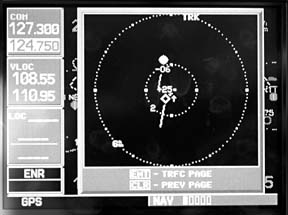
Think of TIS as a ground-based version of TCAS that’s a little less accurate but a lot cheaper. It receives transponder information from all aircraft – whether tracked or not – and via the Mode-S addressable link, it displays the position of these aircraft relative to the host airplane sporting the Mode-S datalink.
TIS relies entirely on Mode-S-capable secondary radar. It won’t display primary targets and it only works when the host airplane is in view of a TIS-equipped ATC terminal radar site, of which there are now about 110, with more sites planned. (See the coverage map below.)
TIS won’t see much – if any – deployment on Center radar because the sweep is too slow for the system to deliver useful refresh rates of in-view targets. This is primarily an anti-collision system for terminal areas and not necessarily all of them.
GTX330
Garmin’s new GTX330 is a direct response to the FAA’s “encouragement” of manufacturers to offer Mode-S products to push what has thus far been nascent technology for GA. (We wouldn’t use the word “blackmail” but we’ve heard others utter it.) Not to suggest that there’s not a commercial market for Mode-S/TIS systems. We think there is.
But first, the transponder itself. The GTX330 is state-of-the-art digital technology. It’s a powerful box – 250 watts output that even a cranky ground system should see. It has all the basic features you expect of any transponder, plus some interesting operational tricks beyond the Mode-S/TIS function. Size wise, it’s standard rack width and height. But it has bunches of buttons – 20 in all – that you don’t find on the typical KT76A. Discrete codes are entered via dedicated keys; just punch them in and they’re seamlessly accepted. A VFR-code button automatically sets a 1200 code and, in the event that you forget to switch the thing on, the transponder has an auto-on feature that brings it alive when the airplane reaches a designated groundspeed – 35 knots. It also automatically reverts to standby after landing, with a user-settable delay. These functions are manually controllable as well.
A key new to the transponder set is one labeled FUNC. This scrolls through a set of auxiliary features that Garmin appears to have added to tart up what is still a $5000 transponder. Toggling the function key calls forth up and down flight timers, elapsed flight time, pressure altitude from the encoder, OAT and density altitude if the airplane has air data and an altitude minder that activates a voice alarm when an altitude limit is exceeded. (Values governing these warnings are user settable.)
The function key also controls the display brightness and contrast. The display itself is of the DSTN liquid crystal variety similar to that used in the Garmin 150/250/300 series. It has dense gray characters against a greenish background and reverse video for night ops. The discrete code is in large text on the left, auxiliaries such as timers and the altitude nag are on the right.We don’t think of transponders as having a learning curve, exactly, but this one does, especially when the TIS functions are considered. These functions are controlled entirely via menu – albeit minimally – from the Garmin 430/530 which does traffic display duty. We suspect that many owners won’t fool with the transponder’s higher functions but we found them useful, especially the timers.
Traffic, Traffic
Unless you’re a loyal supporter of FAA boondoggle technology, the only real reason for buying a Mode-S transponder is the traffic function, leading to the pointed question: does the damn thing work? It does, but one shouldn’t expect too much of the system nor be lulled into complacency in the mistaken belief that it sees all.