











-by Larry Anglisano
If you don’t have a multi-function display in your cockpit yet, youve probably at least thought about installing one. A few short years ago, MFDs were considered high-end-only gadgets but now theyre becoming standard equipment.
Surveying the field of options, we find plenty of credible units to pick from and it may be on the horizon. The capabilities and features seem to change by the week so, to a degree, picking one is like shooting at a moving target.
In our view, the critical task is not so much picking which one is right but avoiding the one thats wrong for your particular airplane. And wrong doesnt mean you might not like the knobs and buttons or the display resolution isn’t quite what you expected. Wrong means you buy the thing and it wont accept the external sensors you want to install or it wont play right with them.
In some ways, this is the most critical thing to know before buying. In this article, we’ll examine the high notes of each of the major MFD systems, with an eye toward describing current and future capabilities.
Buying Criteria
So lets say youve got a spare $10,000 for upgrades and youre shopping MFDs. What to look for? First, size. Unless youre 100 percent price driven, choosing an MFD will be governed by what you can fit into the panel.
Some owners are finding that just slipping one into an existing panel wont work without major surgery and replacement of other middle-aged boxes with something new and expensive. Your modest upgrade suddenly requires a second mortgage to finance. Know what will fit ahead of time; it could narrow your choices substantially.
Next, what do you expect the thing to do? Does your older twin have a radar system that youd like to play on the MFD? Are you hoping to use the display to view approach plates? If datalink weather, traffic and lightning display from a remote sensor are on your wish list, know that going into the deal. If all you really want is a simple moving map with a little color, why spend gigabucks for additional capability beyond what you’ll never use? Cut your losses and buy something simple. This is doubly true if youre not sure you’ll be keeping the airplane for at least three to five years.
Speaking of which, we continue to believe that before embarking upon a high-dollar upgrade, consider what youre about to spend as a percentage of the aircrafts hull value. If the upgrade is more than 10 to 20 percent, think twice about going forward unless the airplane will be part of the family for quite some time.
Avidyne
Weve watched the Avidyne line of MFDs mature over the years and this company can rightly claim to be a pioneer in the field. And no one can argue that its slacked off on the R&D. The line has continued to evolve and remains on the cutting edge, in our estimation.
The latest and greatest offering from Avidyne is the FlightMax EX500. With its 5.4-inch diagonal 65,535-color screen, it could arguably be the prettiest display available to general aviation-and possibly the best display across all segments, including bizjets. No surprise, then, that Avidynes FlightMax displays have been the choice for retrofit in transport category aircraft. We saw one recently in an airline Dash 8, projecting overlaid weather radar images to the crew.
At only 5.4 pounds, the EX500 will interface with a wide selection of old and new radar systems from Bendix/King and Collins, with yet more radar support expected as time goes on. While were on the subject of radar interface, its clear that Avidyne listens to constructive criticism from its dealer network.
For instance, gone is the need for tricky heading synchro converters to properly orient the weather on the screen. After all, when youre boring around in serious weather, the system has to know which way the nose is pointing. Since the average general aviation HSI, say the King KI5252A, outputs an XYZ heading signal, previous FlightMax interfaces required a converter to change the XYZ heading format to ARINC 429, a high-speed data format.
This could easily add an additional $3000 plus substantial time to an installation. But the new EX500 will accept good ol XYZ direct, without conversions. Also gone is the seemingly-forgive us-girlie-man computer-style connector hardware which we found so annoying on the earlier boxes. It has been replaced with rugged and durable D-Sub style connectors, an industry standard.
Also, Avidyne has done away with the space-gobbling external CD dataloader. An earlier generation Avidyne we had installed in the company Mooney, rest its kludgy soul, required us to mount the CD loader under the rear seat. Nowadays, a hand-held data loader plugs onto the face for updating Jeppesen nav data. This is a plus, since smaller panels clearly lack minimal space for extra hardware let alone the surplus volume for loaders used twice a year.
Avidyne says that the new EX500 doesnt require a cooling fan but as reported in our recent avionics cooling fan article, we don’t suggest you install one without a fan. The display produces a lot of heat. In a nutshell, the EX500 can display a moving map with chart detail, contoured terrain and special-use airspace, onboard weather radar, traffic alerts and lightning from a remote WX-500 Stormscope.
The real trick of the EX500 is the internal datalink transceiver that uses the Orbcomm low-earth-orbit satellite network. (See our preview of the FlightMax Datalink Weather Service in the September 2002 issue for more detail.)
Because of the integrated datalink and radar replacement capability, the Avidyne EX500 could be the most complete MFD currently available on the market. Although not the most expensive, at $8995, the EX500 is top tier pricewise. Because of this, Avidyne isn’t angling for the Cherokee/Skyhawk market but the EX500 should certainly be a contender in high-performance single and the twin-engine market.
Worth mentioning is the EX5000, Avidynes large-screen MFD developed specifically for use in the Cirrus aircraft line. Its currently not available in the aftermarket but might be some day. As we reported in the December 2002 issue, the EX5000 serves as the moving map for Avidynes Entegra PFD.
Pros: Avidyne is the acknowledged leader in support of airborne radar sensors, replacing older screens with new, multi-function color displays. Avidyne has impressed us by continually improving display quality and adding sensor functions, including traffic, lightning, datalink and engine monitoring.
Cons: you’ll still need GPS sensors to run any Avidyne map and although the prices of these products are competitive, theyre at the high end of the spectrum.
Garmin
Based on installation patterns in our shop and other shops weve polled, Garmin enjoys brisk sales with the GNS430 and larger GNS530 systems. In some ways, the now mid-priced GNS430 is the gold-plate standard for GPS/comm units. Thousands have been installed.
While neither has been reduced in price and while technically, neither is a true MFD, buyers are recognizing that these boxes-including the humbler 430-do what MFDs do so were including them here. Thats not to say they do everything or do everything well, but they offer the widest range of capability for the least money.
With integral communication, navigation including glideslope and IFR GPS, the GNS430 and GNS530 still do not have radar replacement capabilities or any type of terrain mapping and Garmin says these features arent planned. While this is a shortcoming that might soon be addressed with follow-on products, we wonder how much of the market segment Garmin loses.
Then again, it might not matter because there are still thousands of GA aircraft that need new navcomm or GPS boxes so terrain and ground mapping are low on the list of priorities. The GNS430/530 will accept Goodrich WX-500 lightning data, but these wont play on the map page unless the unit is fed an appropriate heading synchronization or bootstrap source from an HSI or DG.
Be sure you discuss this with your shop before installation because you might be disappointed to learn you cant overlay lightning strikes or cell detail on the base map. What you can do is view the Stormscope data on a dedicated page within the navigator.
New to the GNS430 and GNS530 interface is the Garmin GDL49 datalink box, which uses the Orbcomm satellites to deliver cockpit weather. (See our review in the September 2002 issue of Aviation Consumer.) Although a utilitarian display compared to the Avidyne and Apollo MX20, the GNS430 and GNS530 screens shine bright and not many users complain about the graphics.
The hardware is rugged and reliability is excellent. When first introduced, we found buyers skeptical about putting all the navigation and communication eggs in one basket but total system failures of the 430/530 have been remarkably rare.
We havent seen one completely quit after several years of installing at least a handful per month. Complaints and wish list? We anxiously await terrain and perhaps more colors on the display.
Pros: Best choice overall for GPS-capable mapcomms that also include credible capability for external sensors such as datalink weather, lightning display and traffic/anti-collision.
Cons: GNS430 is too small for much detail and although the GNS530 is much larger, it lacks the basemap detail found in other products, such as the Bendix/King KMD series and the UPSAT MX20. Onboard weather radar is not supported in any of the Garmin products thus far.
UPSAT/Goodrich Avionics
The UPSAT Apollo MX20 is, in our view, the most sought-after MFD on the market for two reasons: its relatively inexpensive and it has a terrific, 6-inch diagonal 65,536-color screen. Like the Avidyne products, it does require an external GPS source but it works we’ll with the GX-series navigators from UPSAT.
Note that weve lumped Goodrich and UPSAT together. Thats because Goodrich Avionics also markets the MX20 hardware under the product name i-linc and they offer special package pricing when purchasing the WX-500 and or Skywatch traffic systems. The Goodrich version of the MX20 is price competitive but before selecting it, put a sharp pencil on the cost over the UPSAT version and consider whether you really want the remote WX-500 Stormscope.
The MX20 can do traffic with the Goodrich Skywatch system and the Ryan TCAD, the aforementioned lightning display and, recently, onboard radar interface. The MX20 currently supports the Bendix/King RDR2000 digital radar.
In addition to weather radar display capability, the upper end MX20-IO has full control capability including tilt, gain and range control and bearing control. This unit in its most complete form can show the user terrain and obstacle awareness, VFR chart data, IFR chart data including Jeppesen approach charts, all with traffic and weather overlay. The approach-plate option is currently unique to the MX20, although a few tablet computers have this capability. (See Aviation Consumer November 2002 for a review.)
Although the terrain awareness feature of the MX20 doesnt meet legal TAWS requirements for for-hire aircraft and large Part 91 airplanes, it can keep pilots we’ll aware of lethal terrain and obstructions. For this reason, the MX20 could very we’ll be the best value in MFDs to date.
At 5 inches high, its also one of the largest in its class. This is where it gets tricky. Since the MX20 needs an external GPS to feed it position information, the challenge is making it and other essentials fit in a convenient location in the panel.
If UPSAT can somehow integrate a GPS, comm and nav inside the MX20, it could easily win world domination in the MFD market. But they havent and probably wont. So for space-challenged panels, an MX20 can be a tough sell.
As for datalink, the forecast is cloudy for the MX20. The leading contender is probably the Merlin system, which uses continuous broadcast from satellite sources. Nice idea but were not sure if it will come together before other datalink options materialize.
At a list price of $14,995, the MX20-IO traffic/radar/lightning/approach-plate capable MFD is one of the best values in this market, in our view. If will be an even better buy if UPSAT improves the number of airborne radar units that the MFD will support. The basic MX20-with moving map detail but no other add-ons-sells for a reasonable $7295.
Pros: the MX20 has a vivid and sharp color display which, until Avidynes new EX500 arrived, was at the top of the league, in our view. Its easy to use, moderately priced and although it lags in some external sensor capability, its no slouch. Unique to the MX20 is the display of Jeppesen approach plates.
Cons: The MX20s radar interface is minimal and datalink weather options havent clarified yet. Its also large enough to be a fit problem in tight panels and some users complain that processor response time is slow.
Honeywell Bendix/King
For as far ahead of the MFD game as Avidyne and Garmin have been, Bendix/King has lagged. It took quite some time to catch up with Garmin in the color navigator area but caught up it has. (Well, mostly.)
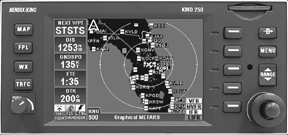
As we go to press, the hot news is a new bargain MFD from Bendix/King called the KMD250. Although we havent seen one yet, this appears to be a downmarket box, selling for under $5000 or about two thirds the price of the more capable KMD550/850 series. At first glance, were impressed with this product because it integrates the biggies: traffic, datalink weather, position awareness and terrain avoidance. However, a note of skepticism: the product isn’t expected to be available until sometime next year and Bendix/King has a way of slipping deadlines.
Bendix/King has added the KMD250 to what it calls its IHAS or integrated hazard avoidance system. This system includes a suite of external sensors that will play on the KMD250, 550 and 850.
As we reported in our review of IHAS in the November 2001 issue, the KMD550 and 850 are identical, except the 850 features a radar adapter card which allows on-screen overlay of the RDR2000-series digital radar.
The KMD250 builds on Bendix/Kings experience with the Skyforce color maps-technology the company bought wholesale from a British company by the same name. It has a 3.2-inch diagonal screen-versus 5-inch diagonal for the 550/850 series-and it features a built-in VFR GPS with a joystick control for navigating through the various functions. In our view, this provides intriguing capability, opening up weather, traffic and terrain without going overboard on price. Further, if you don’t need to spend megabucks for an IFR GPS, with the KMD250, you don’t have to.