











Remember overlaying your ADF needle on an Argus moving map display? This is what started the ball rolling on dedicated MFD displays. Years later, Avidyne revolutionized the big MFD with the original FlightMax series. But the upgrade demand for standalone MFDs has plummeted to near extinction. The first salvo was Garmins 530, whose screen took the GPS navigator to the near-MFD level. The new GTN 750 now crosses the line with every major MFD feature save ships radar. On the other end of the scale, most MFD map functions are mimicked by aeras, iPads and the like-and for far less cash. If your goal includes displaying radar, or demands a panel-mounted display without an accompanying navcomm upgrade, there are numerous products to choose from. Shopping the used market could offer cheaper alternatives. 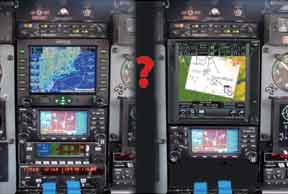
Garmin: MFD and MFD Killer
Garmin still offers the GMX200 MFD in its lineup, but with the GTN750 on its heels we have to wonder for how long. Weve covered the GTN750 (and smaller 650) extensively over the past few months, so here we’ll look at its MFD functions. Just remember this is all on top of it being a full WAAS GPS/nav/com.
In Garmin tradition, the GTN750 is built around a liberal remote sensor interface with a generous availability of data input formats and ports, from RS232 to digital Arinc, and GAMA to Ethernet.
You wont have to place your peepers on the units display for long to realize its up to the dedicated MFD challenge. It sports a near-VGA-quality display and touchscreen controls. That display is a high-resolution mega-color TFT LCD with a 600 x 708 pixel count. Overall, the unit stands tall in the radio stack at six inches vertical, but compared to separate MFD and navigator, its a huge space (and dollar) saver.
The GTN750 comes standard with a wealth of functions that were once optional on retrofit MFDs: Garmin FliteCharts, SafeTaxi, terrain and obstacles, airways and graphical flight planning. Traffic alerting, XM weather and sferics display cost extra but are available. Want to lose the audio panel and transponder from the radio stack? The GTN750 can channel these units remotely.
The GMX200 is a worthy MFD that shares little in common with the GTN750. It originally started life as the MX20 from the old UPS-AT days. Still, most agree that it offers an easy feature set and speedy processor that makes for quick map redraws and efficient weather graphic refreshes. It also has a split-screen mode and impressive terrain functions, including a look-ahead or vertical profile view of obstacles.
Speaking of vertical profile, the I/O version of the GMX200 overlays the Bendix/King RDR2000/2001, RS181-series radar plus Garmins own GWX68 radar. The GMX200 doesnt come with charts. you’ll need to buy a Jeppesen subscription and $2395 Chartview unlock for that. VFR and IFR en route charting is standard, however.
The GMX200 is a space-eater, requiring five inches of vertical space for its crisp and bright 6.5-inch diagonal LCD display. As with any stand-alone MFD, you’ll need a GPS to drive it and the GMX200 plays with most. A top of the line GMX200 I/O Radar unit retails for $17,390 with Chartview option or $13,390 with just traffic capability and charts.
Avidynes EX-Series
Avidyne replaced the popular and worthy EX500 (a good used buy for the right price as we’ll explain later) with the EX600. The newer MFD is big but not huge. It stands 4.93 inches high and fits the standard 6.24-inch rack-width. Weighing 4.75 pounds and fairly deep at 11 inches, the box feels substantial and sturdy.
There’s a lot of display area at 5.8 inches diagonal, and Avidyne stepped up the panning capability for that big display-something the EX500 lacked. With the EX600, you can finally pan the map to look at weather or other features that lurk miles away.
The newer transflective screen technology has many benefits including good visibility in low and high light environments, but can appear dim when wearing sunglasses. Further, this display appeared dimmer than some other displays that were collocated in the radio stacks of a small twin, even though its designed for better sunlight readability. Some owners are pleased with the EX600 in their stacks. Others struggle while using certain sunglasses.
The EX600 and EX500 require 28-volts bus input. A 14-volt system requires a voltage converter. These beefy power supplies are hungry and weve seen more than one stress a marginal charging system. A power supply also means there is another remote box to install, with the associated hassle and expense.
Satellite Weather is supplied by the MLB700, a SIRIUS-based satellite receiver with products provided by WSI InFlight (a HeadsUp XMD76 series, XM-based system will work also). For active lightning data, the TXW670 or L-3 WX500 will easily input, as will nearly every common traffic system including the Avidyne TAS600.