











Like most p
Flying behind a glass panel, Im no stranger to electronic chart systems. These have proven less than optimal, however. Running a chart program on a tablet computer is no picnic in the cockpit. Its awkward and can be risky in turbulence and there’s always the chance of a disc crash at high altitude.
Avidyne has a solution for the Columbia in the form of the CMAX chart system, which runs on the Entegras MFD, but I just don’t see good value in $3000 for that system, plus $900 for annual chart revisions.
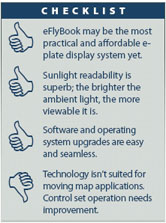
So when ARINC rolled out the eFlyBook earlier this year, it looked like the perfect solution. Small, simple and easy-to-use access to approach plates and other documents. While its a good start toward a practical, readable and affordable way of managing approach plates electronically, its still not quite the perfect solution.
Digital Paper
The iLiad is about the size and weight of four iPods arranged in a rectangle and it fits comfortably in the hand or Velcrod to a kneeboard. The high-resolution (728 by 1024 pixels) screen area is just slightly smaller than a standard NOAA approach chart.
And unlike most computers, the brighter the sunlight, the easier it is to read, since it uses an entirely different technology in which screen contrast improves with additional light. You can also point to and write on the screen using a PDA-like stylus. In short, the manufacturer calls it digital paper and thats an apt description. One sales person we talked to said it reminded him of a high-tech Etch-A-Sketch. The iLiad has no keyboard and only a few buttons: Back, Menu, Up, Down, Select, the page “flipper” and four selection keys for News, Books, Docs and Notes. From the off position, it takes about a minute to boot up and another minute to select the desired document: a SID, STAR, approach plate, airport diagram or the Take-Off and Alternate Minimums for a particular airport.