











If our conversations with fellow pilots are typical, many of us are looking for a practical electronic alternative to paper charts in the cockpit. But it remains an elusive goal, hampered by technology thats frustratingly close, but not quite there. But how about tablet computers pressed into the electronic flight bag role? Weve heard about and seen a handful of these. Can they work? For a tablet to hit the sweet spot, the tablet itself, its software, mounting and wiring have to work just right in turbulence, poor lighting and in cramped cockpits. And they have to do it without introducing so much workload they become what a friend of ours irreverently calls HDD or “head-down displays.” For this review, we flew the Fujitsu P1610, the Motion LS800 and the solid-state Samsung Q1-SSD mobile PC, all running identical FlightPrep Chartcase Pro electronic flight bag software. FlightPrep also loaned us a WAAS-enabled Globalsat BT-338 GPS receiver and a WxWorx XM weather receiver that communicates with the tablets via wireless Bluetooth signals. The tablets reviewed here are small PCs optimized for portability. They use a tablet version of the Microsoft Windows XP operating system and can run the same PC applications typically found on a desktop or laptop. Where they part company with desktops is their ability to lie flat with the screen facing up and to accept input from a touch screen rather than-or in addition to-a keyboard. For example, the Fujitsu initially looks like a miniature laptop. However, the display swivels and folds back down onto the keyboard with the screen facing outward. The Samsung has a separate lightweight keyboard that plugs in when needed, and the Motion tablet doesnt come with a keyboard, although it will accept one. You control programs by touching on-screen icons or boxes with a stylus. For software options that require character input, you either hand-write the letters in a small window which is translated into “typed” text, or peck away at a simulated keyboard on the screen. With the Fujitsu and Samsung units, you can also use any object-including a fingernail-in lieu of a stylus.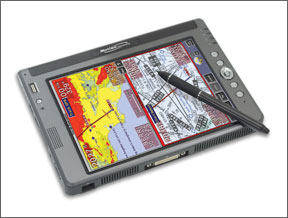
Samsung Q1-SSD
Of the three tablets tested, this was the winner, in our view. Its light and fits easily in the lap or mounted to a kneeboard. It contains a solid-state 32GB drive thats immune to altitude and shock. Even with a slower processor, the faster drive resulted in smoother chart scrolling than the other two tablets. It also has the best