











We asked Dan Barks, Business Director for GA Operators and Dealers at Honeywell, why this was a good time for Honeywell to offer an aftermarket PFD. His response: “Honeywell has been refocusing on GA with the Bendix-King line. We have stack avionics, portables, but the missing product was a PFD.” That PFD has arrived with the Bendix-King KFD 840. The 8.5x7x7.3-inch unit replaces the traditional six-pack with a display and functionality reminiscent of the older Avidyne Entegra PFDs. Thats not to say this is old technology-the hardware and display symbology is derived from Honeywells high-end Primus Epic cockpit suite-but the philosophy behind the KFD 840 is traditional: big PFD designed to play with navigators and an MFD on the center stack. 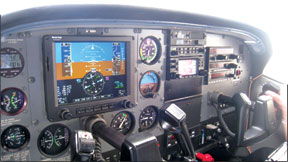
Big Screen, No Clutter
The KFD 840 does offer a larger PFD attitude display than either of the two major competitors, the Aspen EFD1000 and the Garmin G500/600. The screen is 8.4 inches diagonally and backlit with LEDs rather than a CFC bulb. Its bright and easy to read in direct light. Data shown in the lower half of the display, such as waypoint info or groundspeed, is drawn in good-sized numbers against a simple black background. Overall, we liked the display, with our only beef being that some of the fine lines on the HSI and attitude ladder were thin, perhaps one pixel wide, so they didnt appear to move smoothly, in our opinion.
Two nice touches on the altitude tape are the saw-tooth markers and a dedicated minimums bug. The saw-tooth is a zig-zag line on the altitude tape makes it easier to see at a glance where you are relative to 500-foot increments of altitude. The minimums bug lets you dial in a DA or MDA for an instrument approach, and have it shown both as a value below the glidepath indicator and as a unique bug on the altitude tape. The displayed number also turns yellow at minimums.
There are two standard-rate bugs shown as triangles on the roll indicator that adjust with true airspeed. Tuck the roll indicator inside the bug and youre at a perfect bank angle for a standard-rate turn at your current true airspeed. This is definitely simpler than looking down to the turn rate vector that normally sits above the HSI on most glass panels. The roll pointer can also be reconfigured to sky-pointer mode if you prefer.
Two MFD-like tricks you can do with this PFD are checklists and weight and balance. The checklists are created by the owner and put on an SD card as text files. They can be any text you want and you can make up to 20 pages of them. The weight and balance function is still in development and is a bit more sophisticated. Its customized to the aircraft, and lets the pilot