











Before the fan-boy and anti-fan emails start pouring in, lets get one thing clear: Were pegging the iPad as the best bet for most pilots for replacing paper charts and approach plates in the cockpit. This is not a surprise with a device designed for reading stuff comfortably. Weve said before and were saying again: If you want advanced functions-GPS navigation, TAWS, on-board weather, or even some kinds of interactive documents-then the iPad may let you down. Most importantly, it may let you down unexpectedly, as with the iPads GPS that works great, except when it doesnt. There are at least two external GPS units for to the iPad, but we havent tested them. If your needs extend to those other functions, there are other more robust and versatile options. There are also cheaper options if your budget cant justify an iPad. And even using the iPad, there are several options for view charts that offer different capabilities and cost. 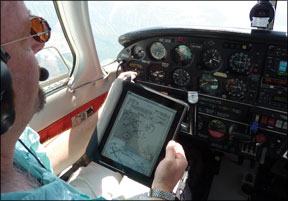
iPad Sweet Spot
What the iPad does we’ll it does phenomenally well. The physical device is simple to use: A button to turn on, a tap to launch your chart reader, and a suite of taps, flicks and pinches to select, scroll and zoom. Weve watched pilots who we know struggle with navigating even a Garmin GPSMAP 496 whip through the iPad with ease.
The screen is also super-sharp and color. Anyone with enough vision to fly can read an approach plate when it fills the screen. Most eyes can even read it at half that size, as happens in the split-screen mode some apps offer. With the 9.5 by 7.5-inch iPad in a grippy sleeve on our lap or in one of several kneeboard and mounting solutions, its easy enough to use in the cockpit.
The screen has a significant glare in the daytime and can be too bright at night (although switching to an inverse view helps). If we could wave a magic wand, wed want an iPad that was just a bit smaller. The touchscreen is also limited when it comes to jotting down information. Freehand writing with your finger is possible, but neither comfortable nor clean. Dont count on the battery life; weve found 24-volt to USB power adaptors for under $5.
While you can pay to play at $499 for a 16GB unit, we think you want to go at least to the $629 16G/3G model to get the internal GPS (or look at one of the external GPSs that connect). Even the mediocre internal GPS will almost always place you on a chart close enough to get you in the right part of the sectional chart or the airport diagram. The GPS also makes preflight planning much easier, as the radar or METARs youre reviewing on the ground are relative to your location. In our testing of the iPad, its utility for flight planning in the FBO, particularly for weather, was a huge plus. There are cool tricks these apps can play, too. Enter your clearance with airways “ENE V3 CON …” and the app decodes it into waypoints to put into the GPS. The other great plus about the iPad is that download management is built in through WiFi. Tell the app to update your charts