











by Paul Bertorelli
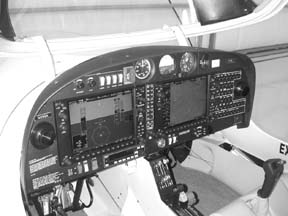
Well forgive you a Pavlovian response to the pictures on these pages. But there’s no point in drooling over them, itll just smear the ink and obscure the intriguing details. In any case, unless youre buying a new airplane, itll be awhile before you can get your mitts on Garmins new integrated primary flight display, the G1000.
In our Oshkosh coverage in the September, 2003, issue, we offered a sneak peek at the G1000, imagining that it would be many months if not a few years before it would be available in anything less than a Cessna Mustang mini-jet. Once again, the relentless march of technological progress has proved us too pessimistic.
As of about April of 2004, the G1000 variant shown here will be available as a step-up option in Diamonds well-regarded DA40 Star and later this year, Cessna will offer it in the 182 Skylane and 206 lines, a development that reflects tectonic shifts in the piston aircraft market.
Boring down to bed rock, what will this thing cost? The G1000-equipped DA40 Star, will retail for $224,900, without an autopilot. With an autopilot and all the options, figure about $258,000. Applying a sharp pencil to Diamonds price list, a comparably equipped steam-gauge Star sells for $245,000 so logically, the G1000 is only a $13,000 box, right? At Garmin, this is known as Maalox Math and owners the world over are phoning Garmin after crunching the same numbers.
Expect a sigh and a wail-not necessarily in that order-from the sales and marketing department if you wish to place an order with Garmin. The reality is that the G1000 will probably sell for five-fold as much and for retrofit availability in piston singles, think in geologic time frames.
But thats not the important point. For light aircraft owners, the G1000 ups the ante in new aircraft marketing and for owners of older airplanes, it will kick off less expensive subsidiary products that are more affordable and appropriate for a 1958 Bonanza.
A Mile Deep
We flew the G1000 in Garmins DA40 test aircraft and two things are immediately obvious: the system is highly integrated with display, nav and comm functions woven together and its a mile deep in capability. In a two-hour wring out and almost as much ground time, we explored only a portion of the G1000s tricks.
A third observation: even for those familiar with Garmins 430/530 mapcomms, the G1000 will require extensive familiarization. We would be hesitant to launch into the clag without several hours of experience with it. Computer Luddites will need more training; some classroom work may not be excessive.
Although the nifty displays make it look like just another PFD-are we really that jaded so soon?-a closer look reveals 29 buttons and knobs on each side of the system, for a total of 58 things to twirl, punch and jab. Welcome to the brave new world of integration.
The most lucid way to think of the G1000 is to saw off the front of a pair of GNS430s and hide them behind the panel or in the tail. Garmin calls these displayless boxes GIAs or integrated avionics units. Wire them up to a pair of CDUs-control display units-and pipe in the output from a solid-state gyro package called an AHRS for attitude-heading reference system. While youre at it, plumb in airdata from the pitot-static system and OAT, then feed that through a fistful of processing horsepower and youve pretty we’ll nailed the G1000 concept.
The displays themselves are closer to the 530s super bright TFT screen than the 430s lesser color supertwist neumatic technology. At 10.4-inches on the diagonal, they are also larger than the 530 and the same size as the screens Avidyne uses in its Entegra PFD system. In the course of our test flight, we maneuvered the displays into direct sunlight and found them eminently readable, with no hint of washout. In cold weather, they take a few minutes to reach full vibrancy.
In the Diamond installation, the CDUs occupy the left and center segments of the panel while the GIAs-specifically the navcomms, transponder and AHRS, are tucked away in an easily accessible compartment under the rear baggage area.
As shown in the photos, the remote package is about the size of a shoebox, with the AHRS housed in a smaller box tacked on the side and the airdata box mounted forward of the cabin, with easier access to plumbing. Diamond picked the tail-mount remote option because it helps with the airplanes forward-tending CG. In other OEM installations, however, the GIAs can go behind the displays, which then hinge forward for access. Garmins Doug Carlson told us that because of the digital communications bus used-its a specially adapted Ethernet-the cabling from the GIAs to the displays is remarkably small, which should make installation simple and, more important, improve reliability.
Speaking of which, the Diamond installation still requires back-up steam gauges. A 3-inch airspeed indicator, electric AI and altimeter are mounted centerstack, just below the glareshield. (The Star is an all-electric airplane; there’s no vacuum pump.) As for backing up the PFD system itself, each manufacturer will have its own approach. In the DA40, there’s a single alternator with the ships battery to run the system for at least 30 minutes in the event of an electrical failure.
The DA40 also has an emergency alkaline battery pack controlled by a manual switch capable of running the electric gyro and limited lighting for 30 minutes but not the PFD.
In other aircraft, we would expect to see dual ships batteries and dual alternators. Since it has no vacuum pump, there is a spare pad on Stars engine but, in reality, dual alternators in this price class may be overkill. As for system reliability, Carlson says the mathematically predicted time between failures of the G1000 attitude package is 12,000 hours. But no real-world data exists to back-up that estimate.
Gyro Side
These photos explain the basic functionality of the PFD and center stack moving map. For display reversion, a single button will display the PFDs attitude/heading/pitot instrument display on the center map but the map cant be shown on left side, only the gyro display can. The left-side display is rich with data, so rich, in fact, that we were happy it can be somewhat decluttered.
Following the FAA standard for glass displays, the basic background is blue sky over brown earth, with an AI superimposed on the horizon line. An HSI occupies the lower portion of the screen and it can be set for full circular or arc display. Airspeed, altitude and VSI tapes are to the left and right and each has a magenta trend line that shows what the value will be in seven seconds, in addition to the current numerical value.
In the lower left of the gyro-side display is something Garmin calls an inset, which can be toggled on and off for decluttering. The inset is basically a condensed version of information from the map page and can show runway information, moving map, traffic, weather and so forth or it can be deleted from the display entirely.
For map scaling on both the inset and the larger map, Garmin has dropped the 430/540-style toggles in favor of a continuously variable-and much faster-knob arrangement. One of many intriguing and safety features the G1000 has is the ability to automatically delete the PFDs extraneous clutter if the system senses an unusual attitude. Garmins Carlson had us crank the Star into a 60-degree bank, which immediately causes both the inset and message blocks to disappear, then reappear when the bank is tamped down.
Similarly, high or low pitch angles will declutter the display and a larger red arrow pointing up or down will momentarily appear, cuing the pilot which way to pull. This display is about as idiot-proof for basic attitude flying as we can imagine, but were sure some idiot, somewhere will find a way to bore it into the dirt.
Information other than basic attitude display is confined to the outermost edges of the screen. Along the top edge are comm and nav frequency windows plus track, distance and waypoint information. Along the bottom edge of the screen are a dozen soft keys whose functions change with operational mode. For instance, in the transponder-setting mode, the keys serve as numerical buttons to punch in a code. (This, along with navcomm/GPS control, can be done from either the PFD display or the center moving map.)
Center Map
One complaint Garmin 530 owners have occasionally voiced is the lack of tonal gradation in the display of terrain on the moving map. The G1000 addresses that and then some with a display that has roughly twice the pixel count of the 530. As does the Garmin AT-formerly UPSAT-MX20, the map has wide color range showing terrain in graduated brown, water as blue, course lines as white and magenta, special use airspace as light blue lines and so forth.
And as with the 530, there are several screen display styles to pick from and literally dozens of data display options within those choices. In addition to the basic map with the above mentioned detail, you can select an IFR-only map which projects IFR detail against a black background. The screen can be split to show data-say flightplan set-up or weather or traffic detail.